
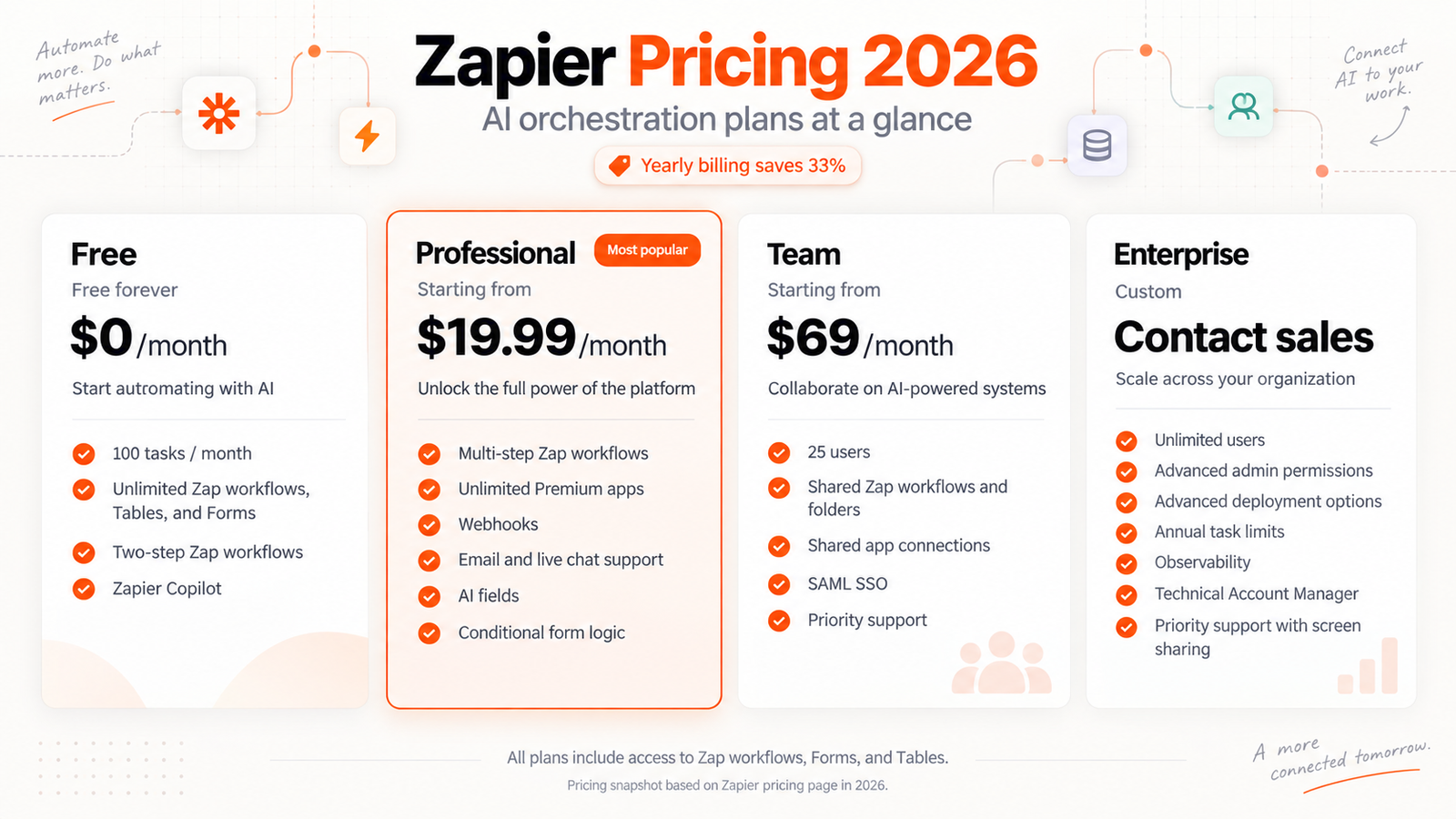
Zapier uses a tiered subscription model starting at $0/month for basic automation and scaling up to custom pricing for large organizations, with paid plans starting from $19.99/month.
Plans at a glance
The current plan names are Free, Professional, Team, and Enterprise.
Our read: If you are running automation alone, stick to the individual tiers. Ignore the Enterprise plan unless you manage a large organization that requires centralized administrative guardrails and dedicated oversight.
What the free tier covers
The Free plan costs $0/month. It includes 100 tasks per month, two-step Zap workflows, 1 seat, 15-minute polling time, 2,500 records per account, and 10 form pages per account.
The free tier works well purely for testing simple connections. A limit of 100 tasks per month runs out quickly during normal daily work, and a 15-minute polling delay means your automated actions do not happen instantly.
Paid tiers and what changes
Professional plans start from $19.99/month, and Team plans start from $69/month. Enterprise pricing requires contacting sales.
Paid plans include multi-step Zap workflows, unlimited premium apps, webhooks, email and live chat support, AI fields, and conditional form logic. They also provide a visual no-code editor, unlimited app integrations, built-in data and AI workflow tools, advanced Zap management capabilities, Zap version control, custom error notifications, Forms, Tables, Zaps, Canvas, MCP, and SDK.
Moving to a paid tier removes the frustrating two-step workflow limit and grants access to email and live chat support when things break. Choose the Professional plan if you work alone, as the Team tier is only necessary for collaborative workspaces.
Costs that are easy to miss
Zapier offers monthly payments or annual payments with a 33% discount, along with pay-per-task billing when task limits are reached. If pay-per-task billing is turned off, Zap workflows pause after the included task allowance is used and resume with the next usage period.
Watch out for sudden task exhaustion. If you disable pay-per-task billing, your automations will simply stop running once the monthly task allowance is exhausted.
Which plan suits which user
Startups, small and medium businesses, and enterprise organizations are the intended users for these plans.
Select the Free tier for minor personal experiments. Buy the Professional plan for solo business operations. Select the Team plan only if multiple people need shared access to the workspace.
Cheaper routes to the same outcome
Billing options include monthly payments or annual payments with a 33% discount.
Always choose the annual payment option if you know you will rely on Zapier for a full year. Saving 33% on the Professional or Team plans is the most direct way to lower your overall automation expenses.
Prices are as published by the vendor in US dollars. What you pay locally may differ once tax and currency conversion are applied.
How we verified this
Evidence level: Researched from official sources. TNTReview did not test this product directly. Every factual claim above comes from the official sources listed here.
- Zapier official site, checked 2026-09-13 (1 fact on this page)
- Zapier pricing page, checked 2026-09-14 (8 facts on this page)
What we could not confirm: the official pages we checked did not state the cancellation terms. Rather than estimate, we left it out of this article.
Last verified: 2026-09-19