
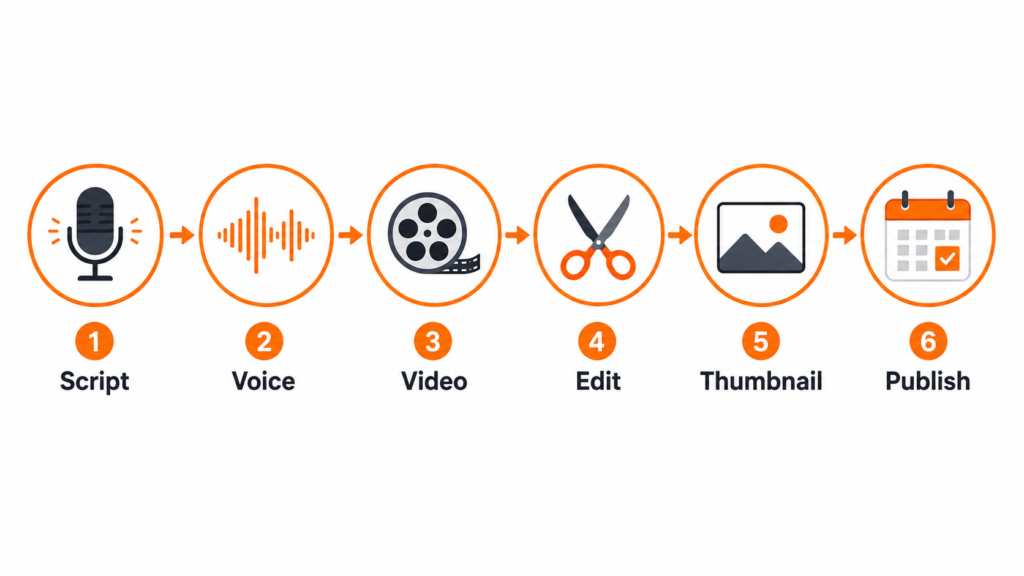
The best AI tools for faceless YouTube channels 2026 cover every step. A faceless YouTube channel lets you build an audience, generate revenue, and grow on autopilot without ever appearing on camera. In 2026, AI tools have made this easier than ever. The best AI tools for faceless YouTube channels 2026 cover every step of production: scripting, voiceover, video creation, editing, thumbnails, and scheduling. You do not need a studio, a camera, or even your own voice.
At TNT Review, we have tested these tools across multiple channels. This is the complete stack that actually works.
What Is a Faceless YouTube Channel?
A faceless YouTube channel produces video content without showing the creator on screen. Common formats include narrated documentary-style videos, animated explainers, top-10 listicles, educational content, and story-driven channels. The creator writes or generates a script, pairs it with AI-generated or stock visuals, adds a voiceover, and publishes.
These channels can generate significant revenue through AdSense, affiliate links, and sponsorships. The faceless format means the content outlasts any individual creator, making it easier to scale and sell.
Best AI Script Writing Tool: ChatGPT
Every faceless YouTube video starts with a script. ChatGPT is the fastest and most flexible script-writing tool available in 2026. You can prompt it with a topic, a target audience, a desired tone, and a length, and receive a full narration script in seconds. It handles hooks, story structure, transitions, and calls to action naturally.
For faceless channels, the workflow is: use ChatGPT to draft the script, then refine it in Claude if you need a more natural, less formulaic voice. Both tools work well together.
Best for: scripting every video in your content calendar quickly.
Pricing: Free tier available. Plus at $20/month.
Visit: chatgpt.com
Best AI Voiceover Tool: ElevenLabs
ElevenLabs is the most important tool in any faceless YouTube stack. It produces AI voices that are genuinely indistinguishable from human narration at their higher quality settings. You can clone your own voice, use one of hundreds of pre-built voices, or create a custom audio persona for your channel.
For faceless channels, consistency matters. ElevenLabs lets you lock in a single voice identity and use it across every video indefinitely. Viewers will associate that voice with your brand even if they never know it is AI-generated.
Best for: professional narration, character voices, documentary tone, and maintaining a consistent channel voice.
Pricing: Free tier (10,000 characters/month). Starter at $5/month. Creator at $22/month.
Visit: elevenlabs.io
Best AI Video Creation Tool: InVideo AI
InVideo AI is the most complete all-in-one video creation tool for faceless channels. You paste in your script, choose a visual style, and InVideo generates a full video with stock footage, transitions, and text overlays. The AI selects relevant clips for each section of the script automatically.
The output is not cinematic, but it is polished enough for YouTube and significantly faster than assembling footage manually. For channels that publish multiple videos per week, InVideo is the difference between a sustainable workflow and burnout.
Best for: rapid video production, educational and documentary channels, and high-volume publishing.
Pricing: Free tier available. Paid plans from $25/month.
Visit: invideo.io
Best AI Video Editor: CapCut
CapCut is the best free video editing tool for faceless YouTube creators who want more control over the final output. Its AI auto-caption feature is particularly useful: it generates captions in seconds, which are proven to increase watch time on YouTube. The AI background removal, noise reduction, and speed ramp features save hours of manual work.
CapCut works best as a finishing layer on top of InVideo or raw footage. Use InVideo to assemble the video, then bring it into CapCut for captions, colour grading, and final polish.
Best for: captions, quick editing, short-form clips from long-form content, and final post-production.
Pricing: Free with optional Pro upgrade.
Best AI Thumbnail Tool: Canva
Thumbnails drive clicks more than almost anything else on YouTube. Canva Pro is the fastest way to create professional thumbnails without a designer. The AI background removal, Magic Design, and text-to-image features make it possible to produce click-worthy thumbnails in under five minutes per video.
For faceless channels, the thumbnail formula tends to be: bold text with a high-contrast background, a relevant image, and a simple layout. Canva’s template library makes this repeatable at scale.
Best for: thumbnail production, channel art, and maintaining consistent visual branding.
Pricing: Free tier available. Pro at $16.99/month.
Visit: canva.com
Best AI Scheduler and Distribution Tool: Blotato
Once your video is ready, Blotato handles distribution. It can take your YouTube video and automatically repurpose clips and captions for TikTok, Instagram Reels, Facebook, and other platforms simultaneously. For faceless channel creators who want to grow on multiple platforms without doubling their workload, Blotato is the most efficient scheduling tool in 2026.
Best for: multi-platform distribution, automated posting, and repurposing long-form videos into short clips.
Pricing: Starter plan from $29/month.
The Full Faceless YouTube AI Stack for 2026
Here is how the complete workflow looks:
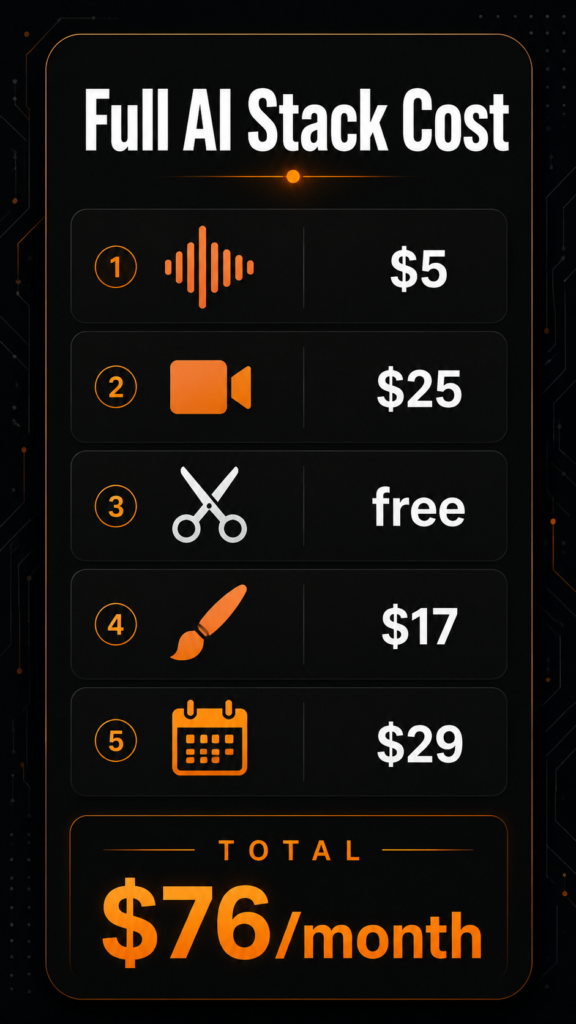
- Script: ChatGPT drafts the script (free or $20/month)
- Voiceover: ElevenLabs generates the narration ($5 to $22/month)
- Video assembly: InVideo AI builds the video from script and footage ($25/month)
- Editing and captions: CapCut handles final polish (free)
- Thumbnail: Canva Pro designs the click-worthy image ($16.99/month)
- Publishing: Blotato schedules and distributes across platforms ($29/month)
Total stack cost (starter level): approximately $71 to $93/month depending on tiers chosen.
That is the cost of producing professional YouTube content at scale without a team, a camera, or a studio.
Free Options for Starting Out
If you are just starting and want to keep costs at zero, here is the free version of the stack:
- Script: ChatGPT free tier
- Voiceover: ElevenLabs free tier (10,000 characters/month)
- Video: InVideo AI free tier
- Editing: CapCut free
- Thumbnail: Canva free
- Publishing: Manual upload to YouTube
The free stack is enough to test the model, validate your niche, and publish your first ten videos before spending any money.
Final Verdict
The best AI tools for faceless YouTube channels 2026 make it genuinely possible to run a professional content channel as a solo creator. ElevenLabs handles the voice, InVideo handles the video, CapCut handles editing, Canva handles thumbnails, and Blotato handles distribution. ChatGPT handles everything before production starts.
The barrier to entry for faceless YouTube has never been lower. The creators winning right now are not the ones with the best cameras. They are the ones with the best AI stacks and the most consistent publishing schedules.
*This article contains affiliate links. TNT Review may earn a commission if you purchase through these links at no additional cost to you. We only recommend tools we have personally tested and use.