The Gemini Omni review 2026 starts with a disclaimer most AI tool reviews skip: this is not a chatbot update. Gemini Omni is a separate product entirely. It is a world model built for video generation and editing, announced by Google DeepMind at I/O 2026 in May, and it does something none of its direct competitors do. You can edit a video by describing the change in plain English and the model applies it while keeping characters, scenes, and context consistent across every edit.
That one feature changes the category. Here is everything you need to know about what Gemini Omni actually is, who can access it right now, and whether it is worth your attention in 2026.
What Is Gemini Omni? Not What You Think
Most people hear “Gemini” and think of Google’s AI assistant. Gemini Omni is a completely different product. Google describes it as a “world model” — one that understands physics, context, and real-world relationships well enough to generate and edit video grounded in that understanding.
The inputs Gemini Omni accepts are: text, images, audio, and video — all at once or in any combination. The output is video. That multimodal input capability is what sets it apart from earlier text-to-video tools that only took a written prompt and generated from scratch.
Two versions shipped at I/O 2026:
- Gemini Omni Flash — the faster, lighter version. Rolling out now to Google AI subscribers and free on YouTube Shorts and YouTube Create.
- Gemini Omni — the full model. Broader capabilities, expected to roll out to higher subscription tiers.
Gemini Omni Review 2026: The Key Features
Conversational Video Editing
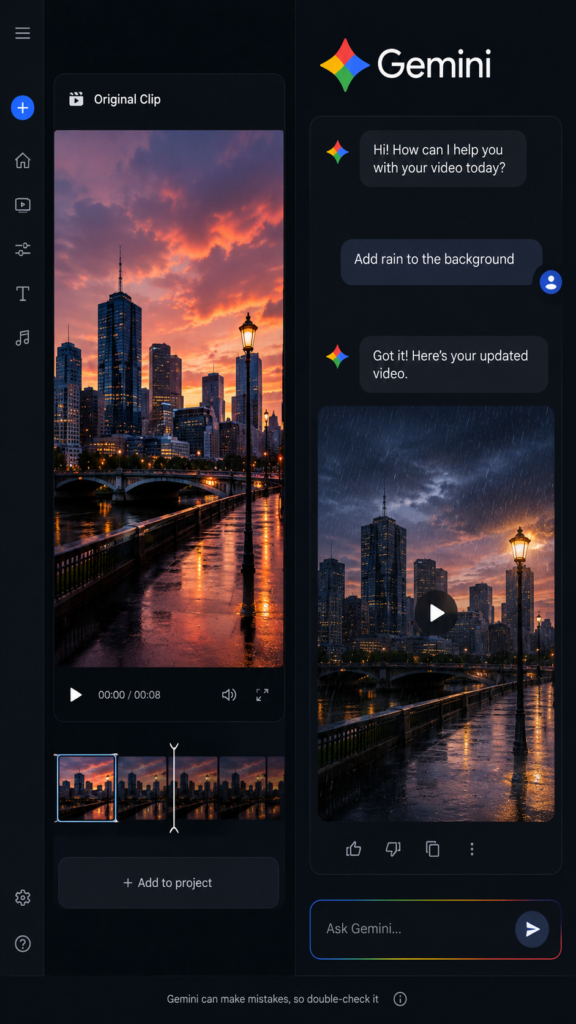
This is the feature that made the I/O 2026 demos go viral. Instead of working with a timeline, keyframes, or editing software, you describe what you want to change and the model does it. “Make the background a sunset.” “Have the character turn around.” “Add rain to the scene.” Each instruction builds on the last rather than starting over from a blank prompt.
The character and scene consistency across edits is what makes this genuinely different. Every other video AI tool on the market today requires you to re-generate from scratch if you want to make a change. Gemini Omni carries the context forward. In the I/O demos, a violinist remained the same person across multiple conversational edits of the same clip — the clothing, face, and environment updated while the subject stayed locked.
Multimodal Input
You can feed Gemini Omni a photo, a piece of audio, an existing video clip, and a text description — all at once — and it generates a new video grounded in all of those inputs. For content creators this means you can use a reference image of a person, describe the scene, add background audio, and get an output that combines all three rather than prompting from text alone.
YouTube Shorts Remix
This is the most accessible feature for most people right now. Any eligible YouTube Short can be selected, and you prompt changes — adding yourself, a visual reference, a different environment — to generate a new version. This is free inside the YouTube Shorts and YouTube Create apps, no subscription needed.
For content creators already working on YouTube Shorts, this is a genuinely useful tool available today at zero cost.
What Is Deliberately Missing
Google made one notable omission at launch: audio and speech editing is withheld. You cannot currently change a person’s voice or generate new speech for a character using Gemini Omni. Google acknowledged this on the model card and cited deepfake concerns during an election year. The expectation is that audio editing will be added once Google’s detection infrastructure is in place.
Access and Pricing: What You Can Use Right Now
Access to Gemini Omni depends on where you are trying to use it:
| Access Point | Cost | Available Now? |
|---|---|---|
| YouTube Shorts / YouTube Create | Free | Yes |
| Google Gemini app (Omni Flash) | Google AI Plus / Pro / Ultra subscription | Yes (rolling out) |
| Google Flow | Included in AI subscriptions | Yes |
| Developer / API access | Not yet published (~$0.10–$0.30/sec rumoured) | No — coming “in weeks” |
Google restructured its consumer AI subscriptions at I/O 2026. The current tiers are Google AI Plus, Pro, and Ultra. If you are already paying for one of these, Gemini Omni Flash is included. If you are a developer wanting to build with Gemini Omni via API, you will need to wait — no public API exists yet as of early July 2026.
Gemini Omni vs the Competition
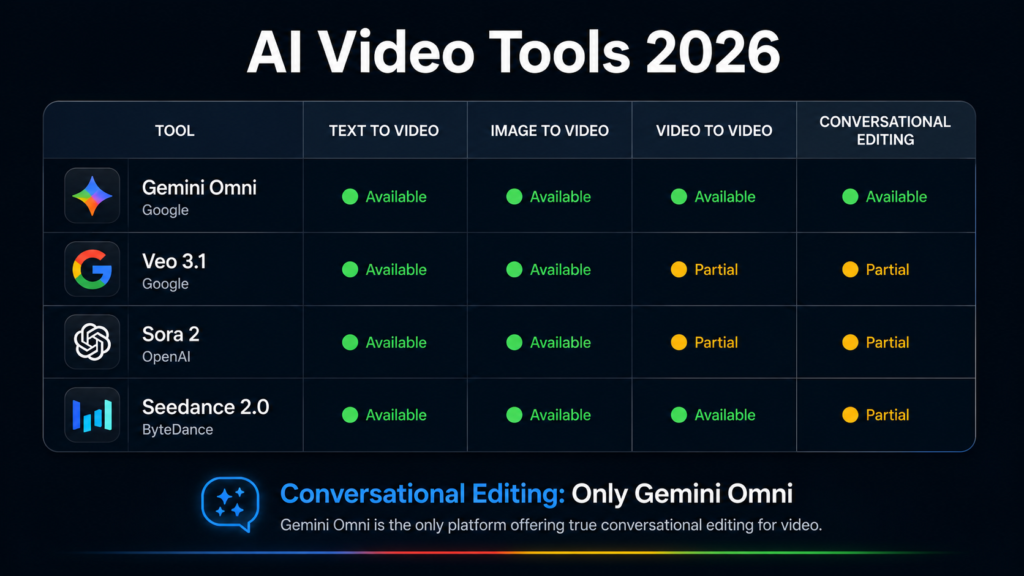
The AI video generation market in 2026 has four serious players. Here is how they compare on the factors that actually matter:
| Model | Max Clip Length | Max Resolution | Conversational Editing | API Available | Price/sec |
|---|---|---|---|---|---|
| Gemini Omni Flash | 10 seconds | High-res (undocumented) | Yes (unique) | Not yet | Rumoured ~$0.10–$0.30 |
| Veo 3.1 | 8s (extendable to ~148s) | Up to 4K | No | Yes (Vertex AI) | $0.40–$0.75 |
| Sora 2 | 12s / 25s (Pro) | 720p / 1024p | No | Yes (sunsets Sept 2026) | $0.10–$0.50 |
| Seedance 2.0 | 15 seconds | 1080p | Reference-based only | Via third parties | ~$0.10 |
A few things stand out. First, Gemini Omni Flash is the only model with true conversational editing. Every other tool requires re-generating from scratch for any change. Second, Sora 2’s API is sunsetting in September 2026 — if you are building a product on it right now, you are building on borrowed time. Third, Veo 3.1 is still the strongest choice for developers who need a production-ready API with 4K output today.
Gemini Omni and Veo 3.1 are not actually competitors. Google ships both and positions them for different workflows. Veo 3.1 is the cinematic, specialist video model. Gemini Omni is the multimodal world model for creators who want to iterate conversationally.
Who Should Use Gemini Omni Right Now
YouTube Shorts creators: Start immediately. The Shorts Remix feature is free, available now, and directly integrated into the platform you are already posting on. There is no reason to wait.
Content marketers and social media teams: Gemini Omni Flash inside the Gemini app gives you conversational editing for video content. If you are on a Google AI subscription, test it now for short-form social content.
Developers building video tools: Wait. The API is not available yet. Veo 3.1 via Vertex AI is the production-ready Google video API right now. Watch for the Omni API drop and re-evaluate when it ships.
Creators currently using Sora 2: Start planning your migration. The Sora 2 API sunsets September 24, 2026. Gemini Omni Flash or Seedance 2.0 via aggregation platforms are your two strongest replacement options.
What Is Genuinely Impressive and What Is Not
The conversational editing is genuinely impressive. The I/O demos were not just marketing — the character consistency across multiple edits represents a meaningful technical leap over anything else publicly available. The YouTube integration is also smart distribution; putting Omni inside Shorts means hundreds of millions of people encounter the technology without needing to pay for a subscription.
What is less impressive is the 10-second clip cap, the missing audio editing, and the lack of a developer API at launch. Google says the 10-second limit is a deployment choice rather than a model constraint, which suggests it will increase. But right now it limits practical use for any video longer than a short clip. The audio editing gap is a real creative limitation that will likely frustrate anyone who wants to generate dialogue or voiceover alongside their visuals.
Verdict: Gemini Omni Review 2026
Gemini Omni is the most interesting video AI announcement of 2026, but it is not the most ready. If you are a YouTube Shorts creator, use it today for free and explore what conversational editing can do for your workflow. If you are paying for a Google AI subscription, Omni Flash is already included and worth experimenting with.
If you are a developer or building a product, wait. The API is not here yet and Veo 3.1 is the production choice for now.
The bigger picture is that Gemini Omni signals where video AI is heading: not just generation, but iterative editing through conversation. When the API ships and the 10-second cap lifts, this becomes the most important video tool to reassess.
For the official announcement and access details, see the Google Blog — Introducing Gemini Omni and YouTube Create for free access via Shorts.
Also worth reading: our Best Free AI Tools 2026 guide for more tools at no cost, and our Grok vs ChatGPT 2026 comparison for the AI assistant side of the landscape.