
Claude Skills Explained: If you are using Claude AI in 2026 and still retyping the same tone guidelines, brand rules, or workflow steps at the start of every session, Claude Skills 2026 is the feature you have been missing. Skills package your expertise, preferences, and processes into reusable modules that Claude loads automatically whenever a task matches. Install once, use every session.
This guide covers exactly what Claude Skills are, the important difference between Claude.ai skills and Claude Code skills, how to install them in minutes, how to build your own from scratch, and the best ones worth adding to your workflow right now.
Quick Verdict
Claude Skills solve a genuine problem: the habit of re-explaining yourself to Claude at the start of every session. If you have ever pasted the same brand guidelines twice or re-described the same workflow for the fifth time, one Encoded Preference skill will change how you work with Claude immediately. Getting started takes under ten minutes. Building your first custom skill takes about thirty.
What Are Claude Skills 2026?
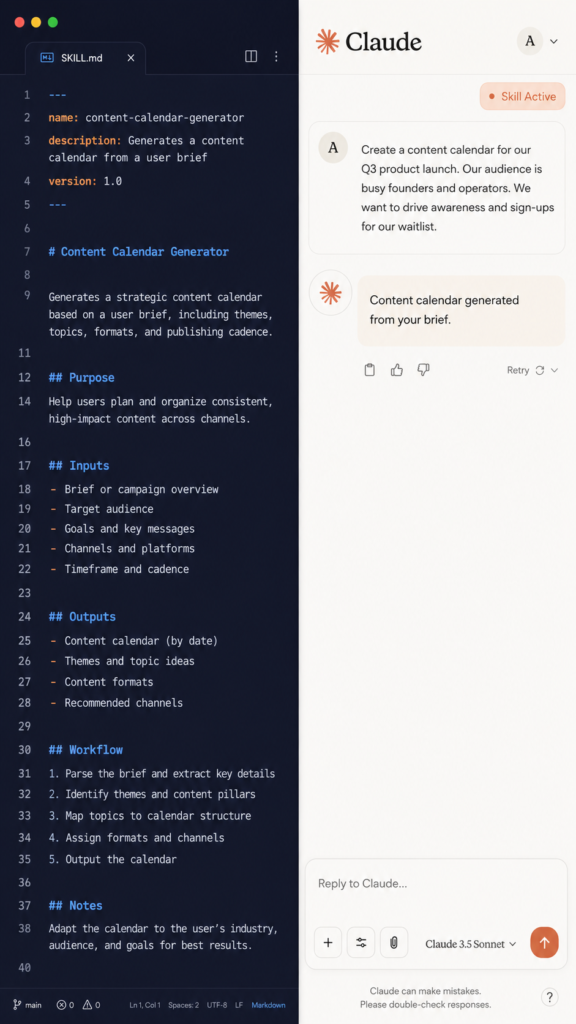
A Claude skill is a folder containing a file called SKILL.md. That file has YAML frontmatter at the top (name, description, which tools to allow) and a markdown body with the actual instructions Claude should follow for a specific type of task.
Think of it like an onboarding guide for a new assistant. Instead of explaining your brand voice, code review checklist, or commit message format at the start of every conversation, you write it once in a SKILL.md file. Claude reads it automatically when the task is relevant and applies it without being prompted.
The architecture is called progressive disclosure. When Claude starts a session, it reads only the name and description from each installed skill (about 100 tokens per skill). When you give Claude a task, it checks whether any skill descriptions match. If one does, it loads the full skill. If none match, the skill stays out of context. You can have 50 or more skills installed without any slowdown on unrelated conversations.
Skills are not always-on. They are auto-discovered. A vague description means your skill rarely triggers. A specific description means it triggers reliably every time. This is the most important thing to understand before you install or build anything.
Claude.ai Skills vs Claude Code Skills: Two Different Systems
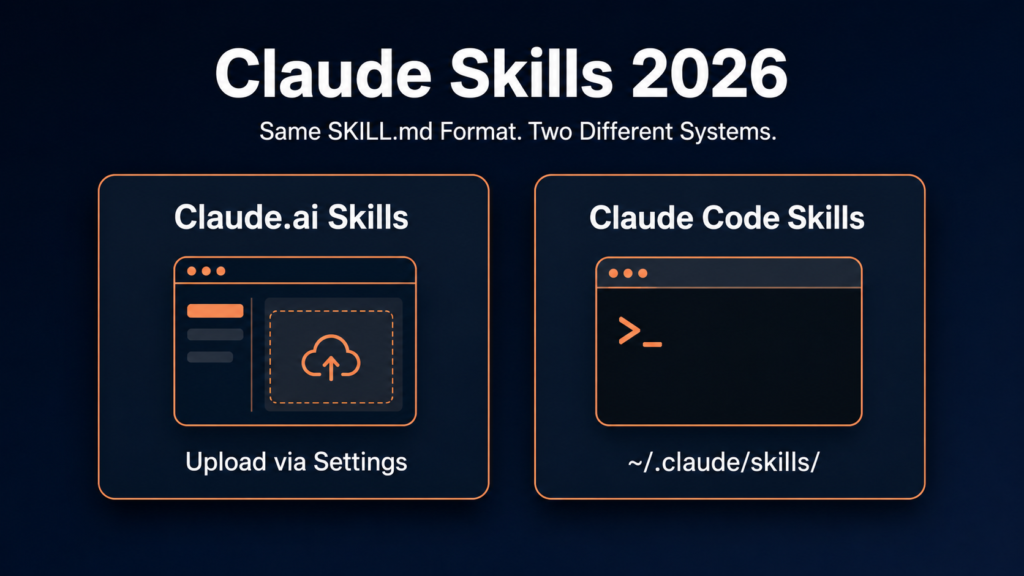
This is where most confusion about Claude Skills 2026 starts. The term refers to two separate feature systems that share a name and the same SKILL.md file format but are accessed differently.
| Feature | Claude.ai Skills | Claude Code Skills |
|---|---|---|
| Where they live | Upload via Settings > Customize > Skills | Folders in ~/.claude/skills/ or .claude/skills/ |
| Who installs | You (or org admins for Team and Enterprise) | You, per project or globally |
| Advanced features | Standard SKILL.md format | Subagent forking, hooks, allowed-tools |
| Team rollout | Yes, via Organization Settings | Shared .claude/skills/ folder in a git repo |
The good news: the core SKILL.md format works on both. A skill you build once works across Claude.ai, Claude Code, and the API. You only need to know which installation method applies to your surface.
For Claude.ai (browser or desktop app): Go to Settings > Customize > Skills > Upload. Zip the skill folder first. After upload, Claude reads the file and shows the skill name and description.
For Claude Code (terminal): Place the SKILL.md folder in ~/.claude/skills/ for personal installation across all projects, or .claude/skills/ inside a project folder for project-scoped installation. Type /skills inside a Claude Code session to confirm it loaded.
Two Types of Claude Skills Worth Knowing
Before installing or building anything, understanding these two categories will save a lot of confusion.
Capability Uplift Skills
These give Claude abilities it does not have natively. Before the skill, Claude cannot reliably do the task. After installing, it can. Examples include generating properly formatted Excel files, creating structured PDFs, running browser automation tests, or scraping web data with consistent output. These skills typically include executable Python or Bash scripts in a scripts/ subfolder alongside the SKILL.md file.
Encoded Preference Skills
These capture how your team does something Claude already knows how to do in general. Claude can write blog posts, but your skill encodes the exact format, word count, H2 structure, and CTA placement your brand needs. Claude can review code, but your skill encodes your team’s specific checklist. These are usually just a SKILL.md with instructions and no supporting code. They are the easiest to build and the fastest to see results from.
If you are new to skills, start here. Pick one workflow you repeat constantly, write the steps in a SKILL.md, and install it.
How to Install Claude Skills: 3 Methods
Method 1: Plugin Marketplace (Fastest)
Inside any Claude Code session, type /plugin. Navigate to the Discover tab, find the skill, and press Enter. Claude asks whether to install as User (all projects) or Project (current repo only). The official Anthropic marketplace includes several well-maintained skills, including the frontend-design skill with 277,000+ installs as of mid-2026.
Method 2: Curl One-Liner via Agensi
Agensi is the largest security-scanned skills marketplace. Install any listed skill with one command:
mkdir -p ~/.claude/skills && curl -sL https://www.agensi.io/api/install/SKILL_SLUG | tar xz -C ~/.claude/skills/Replace SKILL_SLUG with the skill name from the Agensi listing page. Every submission is scanned for dangerous commands, hardcoded secrets, and prompt injection before being listed.
Method 3: Manual Copy (GitHub or Custom Skills)
# Personal install — available in all projects:
cp -r my-skill-folder/ ~/.claude/skills/

# Project-scoped install — current repo only:
cp -r my-skill-folder/ .claude/skills/
Restart your Claude Code session after copying. Type /skills to verify it loaded.
How to Build a Claude Skill from Scratch
The folder structure Claude expects:
my-skill/
├── SKILL.md          # Required
├── scripts/          # Optional — Python or Bash scripts Claude can run
├── references/       # Optional — reference docs
└── assets/           # Optional — templates, example files
Critical naming rules: Folder name must be kebab-case (my-skill, not MySkill). The file must be named exactly SKILL.md, case-sensitive. skill.md, Skill.md, and Skills.md are all silently ignored. No README.md in the skill folder root.
The YAML Frontmatter (Most Important Part)
Claude reads this first to decide whether to load the skill at all. Most skill failures are description failures, not instruction failures.
---
name: content-calendar-generator
description: >
  Generate structured weekly content calendars from a strategy brief.
  Includes platform-specific character counts, hashtag limits, and
  posting time suggestions. Use when the user asks to plan or build
  a content schedule, content calendar, or posting plan.
allowed-tools: Read, Write
---
Description formula that works: What it does + When to use it + What it produces. Make it specific enough that Claude thinks “this is a job for the skill.” A vague description means the skill never triggers no matter how good the instructions are.
The Skill Creator: Build Skills Without Writing Markdown
Anthropic ships a meta-skill called Skill Creator that interviews you and generates the skill structure for you. It is pre-installed in Claude Desktop and Claude Cowork. For Claude Code users, install it first:
/plugin install skill-creator@anthropic-agent-skillsDescribe the workflow you want to automate. Skill Creator runs a Q&A, generates the SKILL.md, then tests descriptions against example prompts to find the one that triggers most reliably. It uses an eval-driven optimization loop that solves the biggest problem with hand-written skills: descriptions too vague to trigger reliably in practice.
Best Claude Skills to Install in 2026
With over 1.2 million skills indexed across marketplaces in 2026, the signal-to-noise ratio is a real challenge. These ten have demonstrated real install volume and genuine workflow impact.
| Skill | Type | Best For |
|---|---|---|
| frontend-design (Official Anthropic) | Encoded Preference | Developers who want distinctive UI rather than default AI output |
| skill-creator (Official Anthropic) | Capability Uplift | Building new skills with an eval-driven optimization loop |
| code-reviewer | Encoded Preference | Teams needing systematic PR review with configurable focus areas |
| brand-guidelines | Encoded Preference | Creators locking in brand colors, fonts, and tone of voice |
| content-calendar | Encoded Preference | Marketing teams generating posting plans in a consistent format |
| newsletter-writer | Encoded Preference | Writers locking in newsletter structure, word count, and sections |
| xlsx | Capability Uplift | Data teams needing real Excel files with formulas and formatting |
| webapp-testing | Capability Uplift | QA teams running browser automation and screenshot capture |
| sentry-code-review (Sentry official) | Encoded Preference | Engineering teams with Sentry for production-aware PR reviews |
| obra/superpowers | Mixed | Developers wanting a community pack of 20+ battle-tested skills |
Install frontend-design: /plugin install frontend-design@anthropic-agent-skills
Find more skills at the official Anthropic skills GitHub repository and the awesome-claude-skills community list.
Claude Skills vs MCP Servers vs Slash Commands
MCP servers add tools to Claude: web search, database access, browser control, file system operations. Think of MCP as the kitchen equipment.
A skill is the recipe. It tells Claude when and how to use those tools for a specific task. You can combine them: a Sentry code review skill defines the PR review workflow in SKILL.md and fetches live error data via MCP. But in most cases, a skill alone is enough to start.
Slash commands are user-invoked. You explicitly type /deploy or /review. Skills are model-invoked: Claude decides based on context. If you want Claude to decide automatically, use a skill. If you want explicit control, use a slash command.
Are Claude Skills Free?
Yes. The SKILL.md format is open-source. Official Anthropic skills on GitHub are mostly Apache 2.0 licensed. Community skills are free to install and share. Some premium marketplace skills charge a fee, but the core ecosystem is entirely free.
Claude itself requires a paid subscription. Claude Pro starts at $20/month (check the official pricing page because this can change). Skills add no cost beyond the Claude subscription you already have.
Claude Skills also work beyond Claude in 2026. The core SKILL.md format is supported by Cursor, OpenAI Codex CLI, Gemini CLI, and GitHub Copilot through the open Agent Skills standard.
Pros and Cons of Claude Skills
Pros:
- Free to install and create
- Works across Claude.ai, Claude Code, and the API
- Progressive disclosure keeps performance fast with many skills installed
- Massive and growing marketplace (1.2M+ skills indexed)
- Open standard supported by Cursor, Gemini CLI, and GitHub Copilot
- Skill Creator removes the technical barrier to building your own
Cons:
- Requires a paid Claude subscription
- Claude Code installation requires terminal comfort
- Poor descriptions cause skills to not trigger reliably
- Skills with executable scripts need security review before installing
- Marketplace signal-to-noise ratio is a challenge at 1.2M+ entries
Who Should Use Claude Skills?
Use Claude Skills if: you use Claude regularly for the same types of tasks, you find yourself retyping the same instructions or tone guidelines, you work in a team where consistent output format matters, or you use Claude Code for development workflows.
Skip Claude Skills if: you only use Claude occasionally for varied one-off tasks, you are on the Claude free plan, or you are not comfortable with basic file management on your machine.
Official Sources Worth Checking
Before installing or building, check the official pages because features, limits, and availability can change:
Anthropic Claude Skills Support Documentation:
https://support.claude.com/en/articles/12512180-use-skills-in-claude
Official Anthropic Skills GitHub Repository:
https://github.com/anthropics/skills
How to Create Custom Skills (Anthropic Support):
https://support.claude.com/en/articles/12512198-how-to-create-custom-skills
Verdict: Claude Skills 2026
Claude Skills 2026 solve a real problem with an elegant solution. If you have ever re-pasted the same brand guidelines or re-explained the same workflow format to Claude, one Encoded Preference skill will change your workflow immediately.
The only real friction is writing a description specific enough that Claude triggers the skill reliably. Start specific. “Use when the user shares a CSV and asks to analyze sales or revenue data” works. “Helps with data analysis” does not.
Start with the Skill Creator, install frontend-design if you do any UI work, and browse the Agensi marketplace for anything domain-specific. The ecosystem is large, actively maintained, and entirely free to explore.
Also worth reading: our Best Free AI Tools 2026 guide for more tools at no cost, and our Grok vs ChatGPT 2026 comparison for context on where Claude fits in the wider AI landscape.